Tweet Screenshot API
The simplest way for developers and businesses to screenshot Twitter. Generate high-quality tweet screenshots with a single line of code.
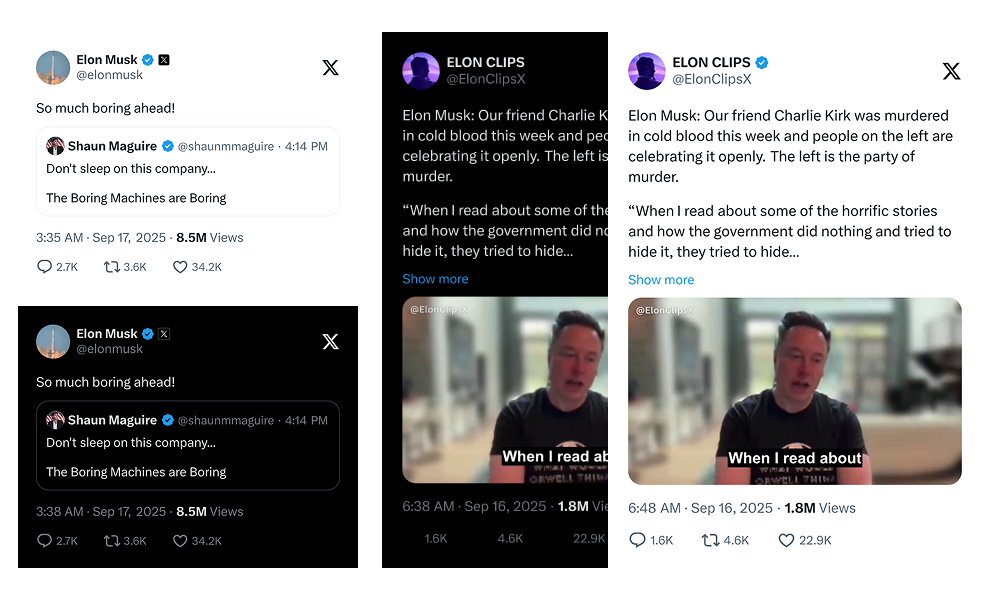
High-Quality Tweet Screenshot Preview
This highlights the API's speed and high-quality output
Lightning Fast
Generate screenshots in milliseconds
Simple API
One endpoint, minimal parameters
Full Customization
Custom themes, sizes, and branding
High Quality
Crisp, pixel-perfect screenshots
Powerful Use Cases for Modern Creators & Developers
From captivating Instagram feeds to AI-powered newsletters, TwitterShots API adapts to your creative workflow.
AI-Powered Newsletters
Embed dynamic tweet insights effortlessly
Enhance your AI-generated newsletters by automatically embedding relevant tweet screenshots. Provide your audience with rich, contextual content that stands out.
Automated newsletter with tweet embeds
Instagram Content Generation
Visually stunning tweet posts for your feed
Transform tweets into eye-catching Instagram posts. Easily adapt tweet content to fit Instagram's visual format, perfect for engaging your audience.
Tweet adapted for Instagram post
TikTok Tweet Slideshows
Create viral content from trending tweets
Leverage trending tweets to create dynamic TikTok slideshows. Capture attention with visually appealing tweet snippets, ideal for quick, engaging video content.
Dynamic TikTok slideshows from tweets
Quickstart: Get Your Screenshot with a Simple GET Request
Our API is designed with a RESTful approach, allowing you to perform all operations using a simple GET request with URL parameters.
Code Examples
Choose your preferred language and start integrating
curl --location 'https://api.twittershots.com/api/v1/screenshot/1617979122625712128' \
--header 'X-API-KEY: YOUR_X_API_KEY'
Fully Customize Your Tweet Screenshots
Complete API reference with all available parameters and customization options
API Endpoint
Base URL and authentication
https://api.twittershots.com/api/v1/screenshot/:statusIdAuthentication
Pass your API key via the X-API-KEY request header
You can get your API key from settings/keys
Path Parameters
Required parameters in the URL path
statusIdstringThe unique ID of the tweet
Query Parameters
Optional parameters to customize the screenshot
formatThe format of the returned image. SVG for lossless scaling, PNG for web sharing, HTML for custom rendering.
themeThe screenshot theme. Choose between light and dark modes.
logoThe type of Twitter/X logo to display. X for current logo, bluebird for classic, none to hide.
showFullTextWhether to show the full tweet content or truncate with "Show more".
showTimestampWhether to show the tweet's timestamp.
showViewsWhether to show the tweet's view count.
showStatsWhether to show statistics like likes, comments, and retweets.
Common Questions
Everything you need to know about TwitterShots API
How to get a screenshot of a tweet in Twitter?
Copy the tweet URL, get your TwitterShots API key from the settings page, and send a GET request to the API endpoint with the tweet's statusId. The API returns a high-quality screenshot in PNG, SVG, or HTML format.
Does Twitter notify when you screenshot?
No, Twitter does not notify users when someone takes a screenshot of their tweets, profiles, or any other publicly visible content. Unlike Snapchat, Twitter has no screenshot notification feature.
Can I customize the screenshot size or background?
Yes. The API provides preset themes and query parameters to adjust the screenshot style, including format, theme, logo type, and visibility of timestamps and stats. For advanced customization, contact our support team.
I'm an AI developer. Is this API useful for me?
Yes, you can integrate this API into your AI application to automatically generate tweet images for content analysis, visual presentation, or dataset creation. You can even copy this page's content as Markdown and feed it to your LLM to help with the integration.
Why are some parameters true by default?
We have selected the most common and user-friendly settings as default values. This allows you to get a high-quality, complete tweet screenshot without specifying any parameters.
What formats are supported?
We support three formats: SVG for lossless scaling, PNG for high-quality bitmap ideal for web sharing, and HTML for raw rendering and custom styling.