Turn any X post
into beautiful
screenshots
in secondsTurn any X post into beautiful screenshots in seconds
Create stunning, watermark-free X screenshots for Instagram, TikTok, and more. Just paste a URL and get professional results.
Everything you needto create perfect X screenshots
Powerful features designed for content creators, marketers, and social media managers
Instant Generation
Paste any X post URL and get a high-quality screenshot in under 3 seconds. No waiting, no hassle.
No Watermark
Get clean, professional screenshots without any branding. Perfect for sharing on social media.
Custom Themes
Match your brand colors perfectly.
HD Export
Download screenshots in 4K resolution. Perfect for Instagram, TikTok, and presentations.
API Access
Integrate with your workflow using our simple API. Perfect for developers and automation.
Mobile Optimized
Works perfectly on mobile devices. Create screenshots on the go from your phone.
Create stunning screenshotsin 3 simple steps
No design skills required. Our tool does the heavy lifting so you can focus on creating great content.
Paste the URL
Copy any X post URL and paste it into our generator. Works with tweets, threads, and profiles.
Customize Your Style
Adjust colors, fonts, and layouts. Make it match your brand perfectly.
Download & Share
Export in HD quality with no watermark. Share directly to Instagram, TikTok, or save for later.
Complete Guide to X Screenshots
Step 1: Copy Any X Post URL
Open X (Twitter) in your browser or app, find the post you want to screenshot, and copy its URL. The link should look like x.com/username/status/1234567890 ortwitter.com/username/status/1234567890. Our generator works with single tweets, full threads, quote tweets, and even X profiles. Simply paste the URL into the input field at the top of the page.
Step 2: Customize the Appearance
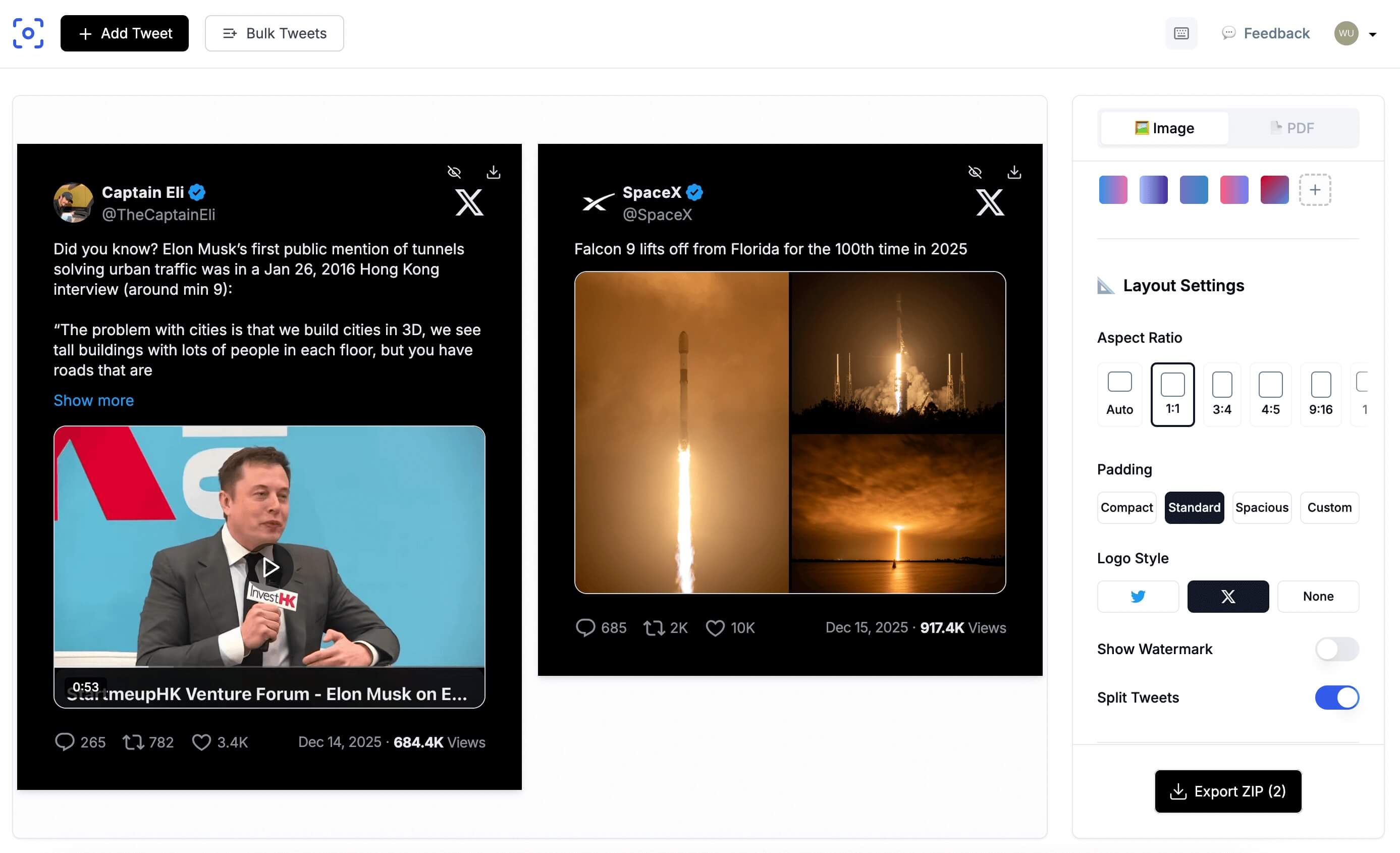
Once the tweet loads in the preview, you can customize every visual detail. Choose from multiple themes including dark mode, light mode, and gradient backgrounds. Adjust colors to match your brand, select the optimal aspect ratio for your target platform (1:1 for Instagram feed, 4:5 for Instagram posts, 9:16 for Stories and Reels, 16:9 for LinkedIn and presentations). You can also toggle engagement metrics, timestamps, and reply indicators to control exactly what appears in the final image.
Step 3: Export in HD Quality
Click the download button to export your screenshot in crisp HD resolution up to 4K. All exports are completely watermark-free, even on the free plan. Choose between PNG for maximum quality, JPG for smaller file sizes, or WEBP for the best compression. The exported image is ready to share directly to Instagram, TikTok, LinkedIn, or embed in blog posts and newsletters. For threads, each tweet is captured as a separate image, or you can export the entire thread as a single scrollable image.
Pro Tips for Better Screenshots
- Use the 4:5 ratio for Instagram carousel posts to maximize screen real estate.
- Enable dark mode for a modern, professional look that stands out in feeds.
- For TikTok and Reels, export at 9:16 with a gradient background for maximum engagement.
- Bulk process up to 30 tweets at once by pasting multiple URLs separated by commas.
Powerful API for developers & teams
Integrate X screenshot generation into your workflow with our simple, well-documented REST API.
Lightning Fast
Generate screenshots in under 2 seconds with our optimized infrastructure.
Reliable & Secure
99.9% uptime SLA with enterprise-grade security and data protection.
Real-time Processing
Process multiple screenshots simultaneously with our async API.
Global CDN
Content delivered from 200+ edge locations worldwide for minimal latency.
Free tier includes 50 one-time API credits to test
curl -X POST https://api.twittershots.com/v1/screenshot \
  -H "X-API-KEY: YOUR_X_API_KEY" \
  -H "Content-Type: application/json" \
  -d '{
    "url": "https://x.com/elonmusk/status/1234567890",
    "theme": "dark",
    "format": "png"
}'{
"success": true,
"data": {
"url": "https://cdn.twittershots.com/...",
"format": "png"
}
}
“Try twittershots.com instead: just paste the post URL, choose options, and generate a screenshot for free without logging in.”
Frequently asked questions
Everything you need to know about our X Screenshot Generator
Is X Screenshot Generator really free?
Yes. The free plan includes 10 screenshots per month with no watermark and no signup required. Paid plans start at $4.99/month for unlimited screenshots and advanced features.
How do I screenshot an X post for Instagram?
Paste the X post URL into the generator, choose the 4:5 or 9:16 ratio theme for Instagram, customize colors if needed, and download. Perfect for carousel posts and stories.
Can I screenshot X threads?
Yes. Paste the URL of the first tweet in the thread and we capture the entire conversation. Export as individual images or a single scrollable image.
What image quality can I expect?
All screenshots are exported in HD quality up to 4K resolution. Text remains crisp and readable on any screen size, perfect for professional content.
Do you offer an API for developers?
Yes. Our REST API supports programmatic screenshot generation with custom themes and multiple export formats. Perfect for automation and integrations.
Is there a mobile app?
No dedicated app yet, but our website is fully optimized for mobile browsers. Create screenshots directly from your phone with the same experience.
Ready to createyour first X screenshot?
Join 7000+ creators who use TwitterShots to create stunning content. It is free, fast, and takes less than 30 seconds.
Trusted by creators at Google, Meta, and thousands of startups