X Post Screenshot for Instagram - Remove Watermarks & Boost Reach


Cross-platform creators face a new challenge: X's automatic watermarks are killing Instagram reach.
If you've noticed your Instagram engagement dropping after posting X screenshots, you're not alone.
Here's what's happening and how to fix it.
Before that you can checkout ig account @ceskasojka.
Here are some highly professional and effective examples of X posts being screenshot to Instagram post that drive subscriptions:

The New Problem: X Watermarks vs. Instagram Algorithm
Currently, when you take a X post screenshot, the platform automatically adds a prominent watermark.
While this helps X with branding, it creates a massive hurdle for cross-platform creators.
Instagram has been vocal about this: Their algorithm actively suppresses content that contains visible watermarks from other platforms (similar to their treatment of TikTok logos).
If you are wondering why your reach is tanking, that big "X" logo in the corner might be the culprit.
The Instagram algorithm uses AI image recognition to detect watermarks and logos from competing platforms.
When it identifies these markers, it reduces the post's visibility in the Explore feed and limits its organic reach.
This means your carefully crafted X content might only reach a fraction of your audience.
Why "Manual Editing" is a Growth Killer
Most creators try to fix this by editing the screenshot manually, but these approaches often backfire:
- Cropping: This often cuts off important context or ruins the visual ratio. You lose valuable content, and the final image might not meet Instagram's recommended dimensions.
- Erasing: It leaves messy artifacts that make your feed look unprofessional. Instagram's algorithm can still detect remnants of watermarks, and your audience will notice the poor editing quality.
- Blurring: It looks suspicious and still gets flagged by IG's AI image recognition. and blurring makes your content look unprofessional.
To maintain high Instagram engagement, you need a "clean" asset that looks native to the platform, not a stolen snapshot.
Your content should appear as if it was created specifically for Instagram, not repurposed from another platform.
The Solution: Generating Clean X Screenshots for Instagram
The most effective way to bridge the gap between X and Instagram is using a dedicated generator like TwitterShots.
Instead of a raw screenshot, it creates a high-definition, watermark-free image optimized for Instagram's aspect ratios (1:1 or 4:5).
Key Benefits for SEO & Growth:
-
No Algorithm Penalty: Clean images ensure maximum reach in the IG Explore feed. Your content won't be suppressed by Instagram's watermark detection.
-
Custom Branding: Match the background colors to your Instagram aesthetic. Create a consistent visual identity across your posts.
-
High Resolution: Crisp text that remains readable even after Instagram's compression. Your content will look professional and polished.
-
Native Appearance: Your X content will look like it was designed specifically for Instagram, not repurposed from another platform.
-
Multiple Aspect Ratios: Switch between 1:1 (Instagram feed) and 9:16 (Stories/TikTok) instantly, ensuring your content fits perfectly on Instagram.
-
Tweet Screenshot API & Automated:: API integration for automated screenshot generation and publishing to Instagram or other platforms using tools like n8n or Zapier.
Step-by-Step: How to Post X Content to IG Safely
Follow these simple steps to create watermark-free X screenshots for Instagram:
1. Copy the Link
Copy the URL of the X post you want to share. You can find this by clicking the share button on any X post and selecting "Copy link to post."
2. Generate
Paste the X post URL into TwitterShots to create a clean visual. The tool will automatically fetch the post content and generate a high-quality image.
3. Customize
Choose a background that pops on the Instagram grid. Select colors, themes, and layouts that match your brand aesthetic. Adjust padding, corner radius, and other design elements to create a professional look.
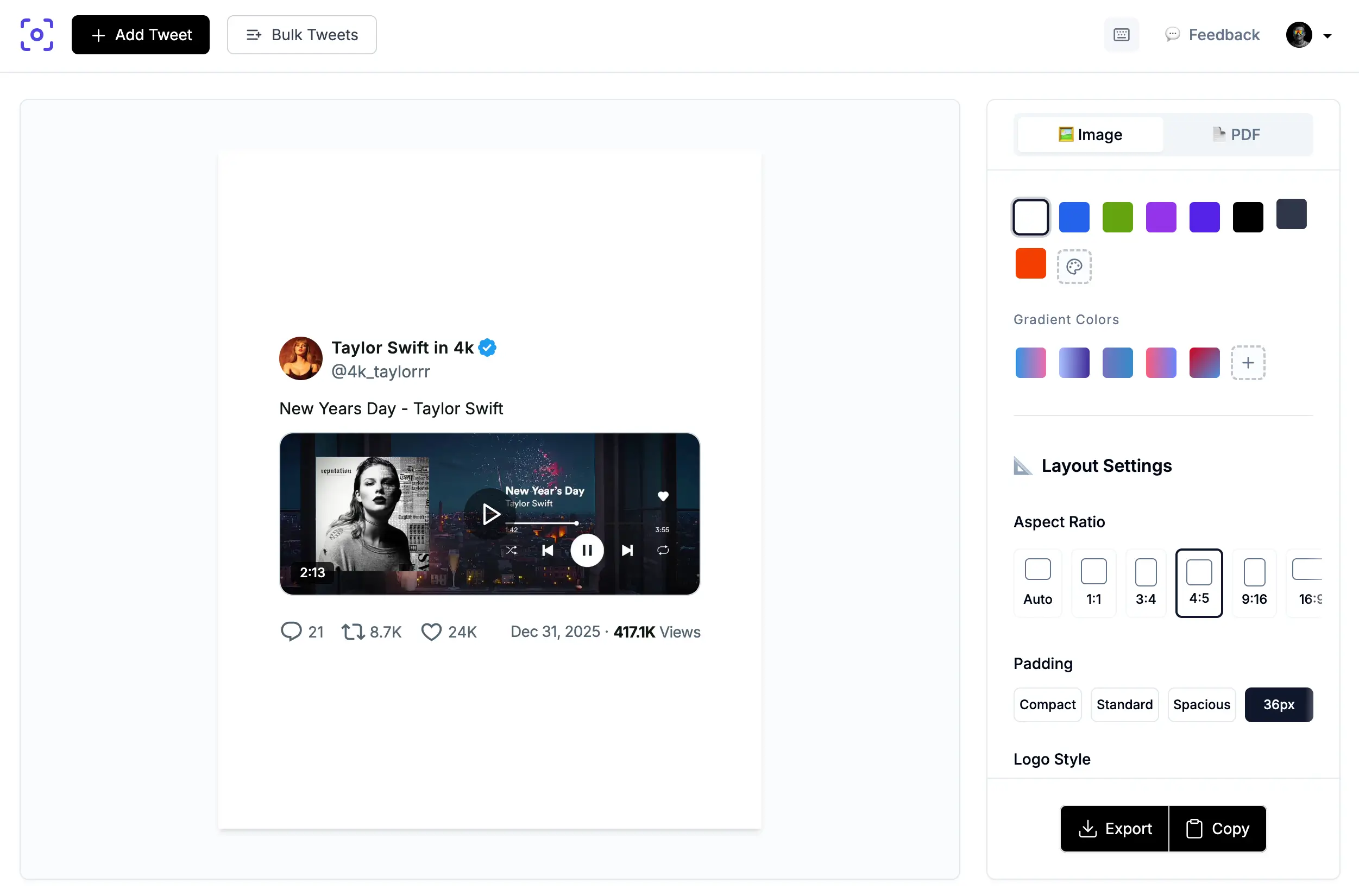
4. Export & Post
Download the watermark-free image and upload directly to Instagram without fear of being suppressed by the watermark-detection AI. Your content will reach its full potential audience.
Best Practices for Cross-Platform Content
When repurposing X content for Instagram, keep these tips in mind:
-
Maintain Visual Consistency: Use the same color palette and design style across all your Instagram posts.
-
Optimize for Each Platform: While the content comes from X, make sure it's formatted perfectly for Instagram's dimensions and audience expectations.
-
Add Value: Don't just repost—add context, captions, or additional insights that make the content valuable for your Instagram audience.
-
Test and Iterate: Monitor your engagement rates and adjust your approach based on what works best for your audience.
Conclusion
X's automatic watermarks are a real problem for cross-platform creators, but they don't have to limit your Instagram growth.
By using a dedicated screenshot generator like TwitterShots, you can create clean, watermark-free images that maximize your Instagram reach and maintain a professional appearance.
Stop letting watermarks kill your engagement.
Start creating native-looking Instagram content from your best X posts today.
Create Clean X Screenshots for Instagram
TwitterShots generates watermark-free X post screenshots optimized for Instagram. Maximize your reach and maintain professional branding.
- Watermark-Free Screenshots
- Instagram-Optimized Formats
- Custom Branding Options
- High-Resolution Export
- Multiple Aspect Ratios