What is Thread Screenshot to TikTok Slideshow and how does it work?
Paste a thread url, TwitterShots turns the thread into a 9:16 slideshow image, perfectly optimized for TikTok, Instagram reels and YouTube Shorts.
Your converted slides will appear here
A Twitter thread screenshot is a visual capture of an entire Twitter/X thread — a series of connected tweets posted by a single author — formatted for sharing on other platforms. Unlike native screenshots that only show one tweet at a time, thread screenshots preserve the full narrative arc, including all text, images, engagement metrics, and timestamps, in a clean, shareable format.
Twitter threads have become one of the most powerful long-form content formats on social media. Writers use them to tell stories, explain complex topics, share tutorials, and build narratives that simply cannot fit in 280 characters. But threads are trapped on X: they are hard to share, impossible to read offline, and disappear from feeds within hours. Thread screenshots solve all of these problems by turning ephemeral social content into permanent, portable assets.
TwitterShots Thread Screenshot tool goes beyond basic capture. It automatically unrolls any thread, formats each tweet as a standalone 9:16 image optimized for TikTok and Instagram, and exports everything as a single ZIP file. The result is a series of professional-looking slides that maintain the original context while looking native to the platform where you share them.
Converting a Twitter thread into a TikTok slideshow is one of the most effective ways to repurpose content across platforms. The 9:16 vertical format is native to TikTok, Instagram Reels, and YouTube Shorts, giving your thread the best chance to reach new audiences who may never see it on X.
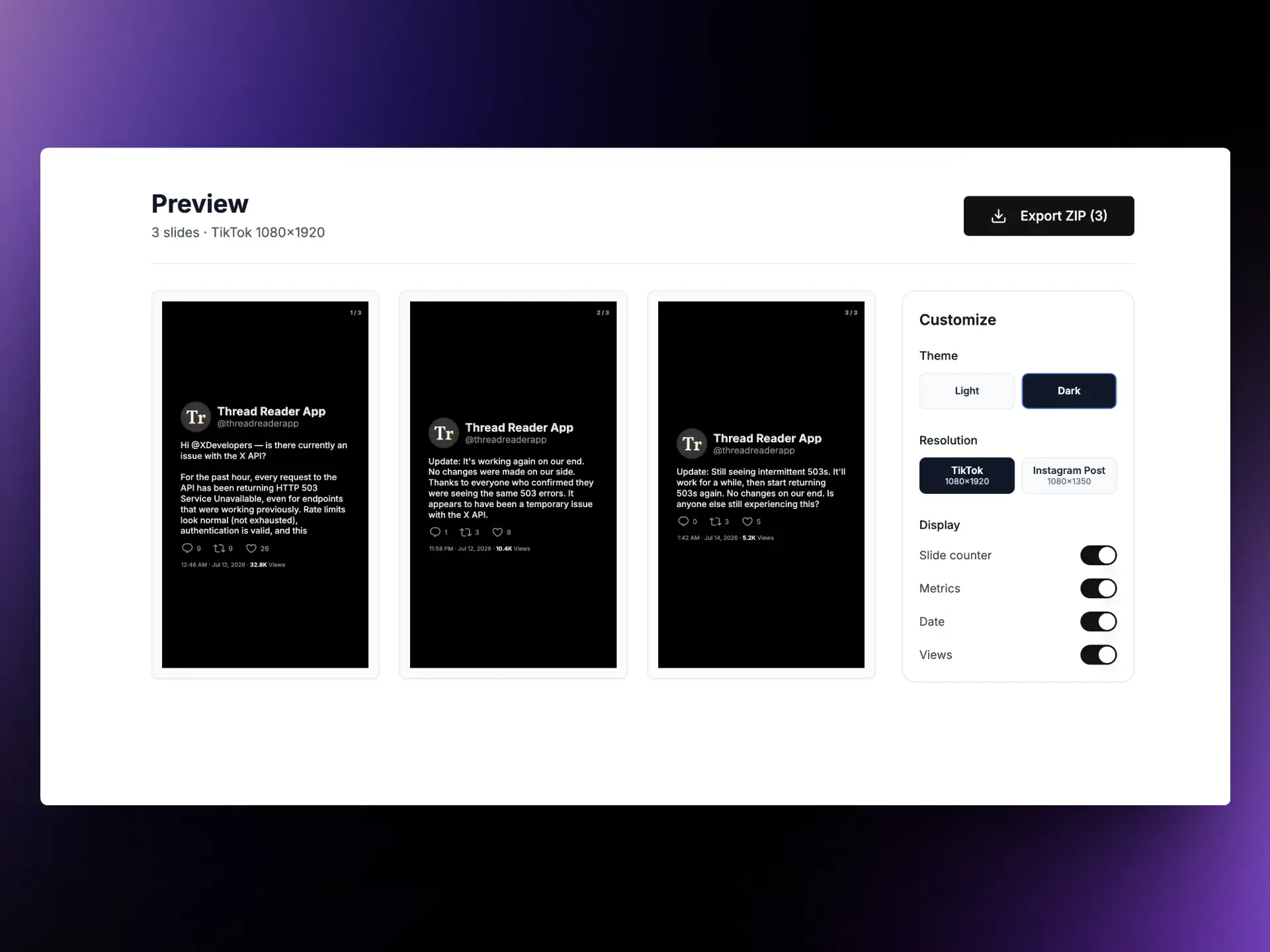
Each tweet in the thread becomes a separate 9:16 slide, maintaining the original text, images, and engagement metrics. The result is a series of images ready to upload as a TikTok slideshow or stitched into a video for Reels and Shorts.
Navigate to the first tweet of the thread you want to convert. Copy the URL from your browser's address bar. The URL should look like x.com/username/status/1234567890. Paste this URL into the input field above and click "Make it Viral." The tool automatically fetches every tweet in the thread.
Once the thread loads, you will see a preview of each slide in 9:16 format. Each tweet is rendered as a standalone image optimized for vertical video platforms. Review the slides to ensure the text is readable and the layout looks correct on mobile screens. The tool preserves images, engagement counts, timestamps, and author information from the original tweets.
Click the "Export ZIP" button to download all slides in a single ZIP file. Each image is exported in high resolution with no watermark. Extract the images and upload them to TikTok as a slideshow, or import them into any video editor to create a stitched video for Instagram Reels and YouTube Shorts.
Thread screenshots are not just for TikTok. Content creators use them to repurpose viral threads into Instagram carousels, newsletter segments, blog posts, and LinkedIn articles. Journalists capture threads as permanent records before tweets are deleted. Educators convert tutorial threads into slide decks for presentations. Marketers turn customer testimonials and product announcements into shareable assets for multiple channels.
The 9:16 format is particularly powerful because it matches the native aspect ratio of the fastest-growing content surfaces: TikTok, Instagram Reels, and YouTube Shorts. When you upload a thread slideshow to these platforms, each slide displays full-screen on mobile, giving your content maximum visual impact. The vertical format also works well for Instagram Stories and Twitter Fleets, making it one of the most versatile export options for cross-platform content strategy.
For teams and agencies, bulk processing is a game-changer. Social media managers can queue up multiple threads, export them all at once with consistent branding, and schedule them across platforms for the week ahead. The ZIP export keeps everything organized, and the high-resolution output ensures your content looks professional on any screen.
Everything you need to know about the product and billing. Can't find the answer you're looking for? Please chat to our friendly team.
Paste a thread url, TwitterShots turns the thread into a 9:16 slideshow image, perfectly optimized for TikTok, Instagram reels and YouTube Shorts.
TwitterShots offers most of TweetPik features such as tweet screenshots and custom themes. The biggest difference is that TweetPik is no longer actively maintained, and TwitterShots is way cheaper and provides more templates and API access with better customer support.
TwitterShots provides similar screenshot capabilities to Orshot but with enhanced features including Instagram post templates, bulk processing, AI translation, and comprehensive API access.
TwitterShots offers more comprehensive tweet screenshot features compared to PostSpark, including multiple template options, thread handling, and API integration.
To use the Twitter screenshot API, sign up for a free account and grab a API KEY, send GET request to the API endpoint with the tweet's statusId.
TwitterShots.com is one of the best free twitter screenshot tools available, with clean screenshots, multiple templates, custom themes, and free API access.