Newsletter roundups
Turn a curated list of posts into images for your next issue. Keep the same visual style across every item.
Screenshots for newslettersMultiple posts. One workflow.
Turn up to 30 X (Twitter) post links into a matching set of screenshots. Paste your URLs, style the batch, and export PNG images together.
Add links
Apply a style
Export images
From links to images
Collect the posts you want. Leave the repeated cropping, resizing, and styling behind.
Add up to 30 public X or Twitter post URLs, one per line. Duplicate links are removed before you open the editor.
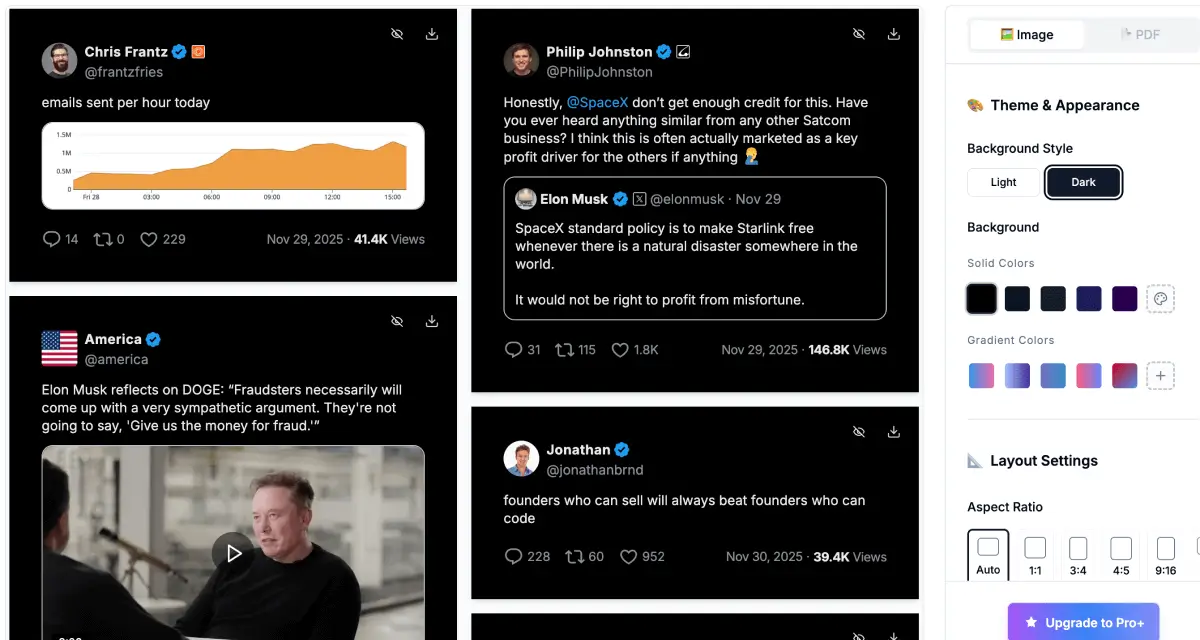
Choose a light or dark theme, background, font, and aspect ratio. Review the posts together and keep their styling consistent.
Save PNG images for individual posts, or use bulk ZIP export on Pro+ or Business to download the image set together.
A consistent batch
Bulk tweet screenshots should look like they belong together. Set the visual direction once, then review the whole collection.
Work from a list of post URLs in one editor. Review each post without opening a separate screenshot session.
Apply a shared theme, background, and font to make a batch feel like a set, not a folder of mismatched captures.
Adjust aspect ratio and spacing for social posts, slides, or newsletters. Check long posts and media before exporting.
Keep images separate for publishing, or package your batch as a ZIP download on Pro+ or Business.
Use bulk screenshot for a selected collection of X posts. Pick a different tool when you need one image, a thread document, or an automated workflow.
Turn a curated list of posts into images for your next issue. Keep the same visual style across every item.
Screenshots for newslettersPrepare social proof, campaign examples, and post collections with a shared background and layout.
Explore branded screenshotsCollect selected public posts as images for reference. Need a readable document from one thread instead?
Open the thread-to-PDF toolKnow before you export
Try the editor with your post links. To download the entire batch as a ZIP, choose Pro+ or Business. A free screenshot allowance does not include bulk ZIP export.
Compare all plans and billing options$12.99 / month
Monthly billing. Annual billing options are available.
ZIP download requires a supported browser. API quotas are separate from web exports.
Limits, formats, and the details worth knowing before you start.
Explore the documentationA bulk screenshot tool converts several X (Twitter) post URLs into images in one workflow. TwitterShots loads your selected posts into a shared editor so you can style and export a matching set without opening and cropping every post manually.
You can add up to 30 unique post URLs per batch. For a larger collection, split the links into smaller batches. Account usage limits still apply, and loading time depends on the number of posts and their media.
You can try TwitterShots with a limited free screenshot allowance. Bulk ZIP export requires Pro+ or Business; it is not included in the free plan or Pro. Check the pricing page for current billing options and plan details.
Yes. Paste public post links from either domain, one per line or separated by commas. Tracking parameters and duplicate post links are removed. Profile URLs are not post URLs; the tool does not automatically collect an entire account or its bookmarks.
The bulk editor creates PNG screenshots. Pro+ and Business users can download them together as a ZIP archive in a supported browser. PDF export is not currently available in the bulk editor. For a thread document, use the separate thread-to-PDF tool.
Yes. Shared theme, background, font, and layout controls help keep screenshots consistent across the batch. Review each post before exporting, especially when your links contain different text lengths or media sizes.
Use publicly accessible posts. Private, deleted, restricted, or temporarily unavailable posts may fail to load. Check the original link on X and remove unavailable posts before trying the batch again.
For a scripted workflow, use the documented screenshot API for each post ID and save the returned images. API credits and rate limits apply separately. The API documentation covers authentication, screenshot options, and integrations such as n8n, Zapier, and Make.
Turn the X posts you have collected into a consistent set of screenshots. Paste your links and make them yours.
Create bulk screenshotsUp to 30 posts per batch. Bulk ZIP export on Pro+ and Business.