Download Twitter
Screenshots in HD
Twitter screenshot download tool. Save any tweet as a beautiful HD image instantly. Perfect for Instagram, TikTok, and content creation.
Download Complete
Screenshot saved as PNG
The best tweet screenshot downloader for creators
Professional Twitter screenshot download tool with all the features content creators love. Download tweets as images in HD quality.
One-Click Download
Download Twitter screenshots instantly with a single click. Save as PNG or JPG in HD quality.
No Watermark
Get clean, professional screenshots without any watermark. Perfect for your content creation needs.
HD Quality
Export screenshots in stunning resolution. Your content looks crisp on any platform.
Lightning Fast
Generate and download screenshots in seconds. No waiting, no processing delays.
Mobile Optimized
Download screenshots directly from your phone. Works perfectly on iOS and Android browsers.
Thread Support
Download entire Twitter threads as beautiful long screenshots or individual posts.
Explore more tools
Related features and integrations for power users
Download tweet screenshots in 3 simple steps
The easiest way to download Twitter screenshots. Save any tweet as an image in seconds with no watermark.
Paste Tweet URL
Copy any Twitter/X post URL and paste it into our tool. Works with single tweets, threads, and even media posts.
Customize Style
Choose from beautiful themes, adjust colors, fonts, and layout. Preview your screenshot before downloading.
Download HD
Click the download button to save your screenshot in HD quality. No watermark, ready to share instantly.
What Is Twitter Screenshot Download?
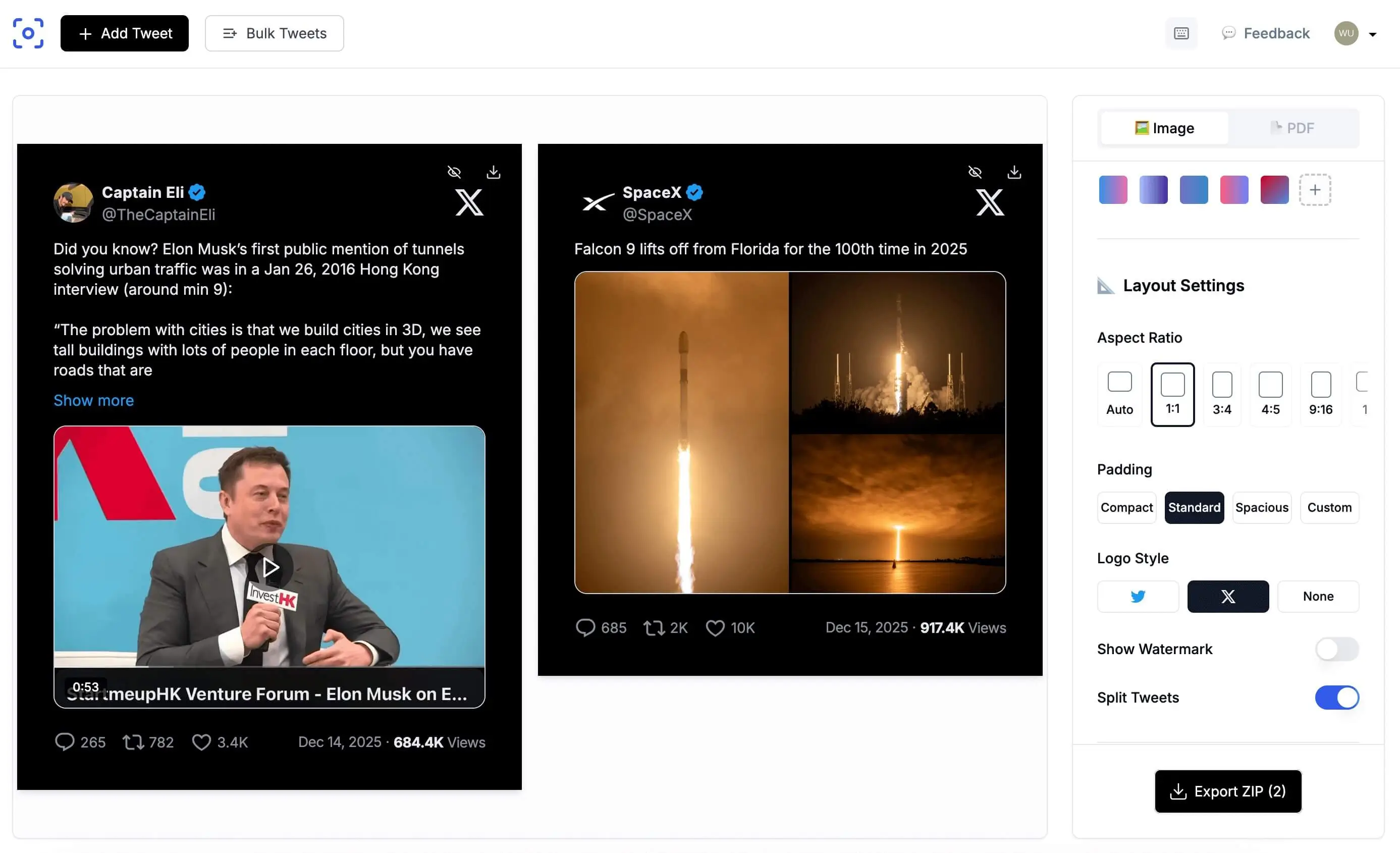
Twitter screenshot download is the process of saving a tweet or thread as a static image file that you can store, share, or republish on other platforms. Unlike a manual screenshot from your phone or computer, a dedicated tweet screenshot downloader captures the full tweet design, including the author avatar, display name, timestamp, text, media, and engagement metrics, then renders it as a polished, high-resolution image ready for social media.
TwitterShots is built specifically for this workflow. Paste any tweet URL and the tool fetches the post data, applies your chosen theme, and generates a download-ready PNG or JPG in seconds. The result looks professional on Instagram carousels, TikTok slideshows, LinkedIn posts, and newsletters, without the clutter of browser chrome or notification bars.
HD Quality and Export Formats
Every screenshot downloaded through TwitterShots is rendered in HD quality. The free plan exports at a resolution that looks crisp on mobile screens and standard desktop displays. For creators who need the highest fidelity, the Pro plan unlocks 4K exports, ensuring that text remains razor-sharp even when zoomed or printed.
We support two primary export formats. PNG is the default choice for most users because it uses lossless compression, preserving every pixel of text and color exactly as rendered. JPG is available when you need a smaller file size for faster uploads to social platforms or email attachments. Both formats are compatible with Instagram, TikTok, X, LinkedIn, and every major design tool.
For designers and developers who need editable output, we also offer SVG and HTML exports on the Pro plan. SVG files can be opened in Figma, Illustrator, or Sketch for further customization. HTML exports preserve the full DOM structure, making them ideal for archiving or programmatic processing.
No Watermark, Even on the Free Plan
One of the most common frustrations with free screenshot tools is the forced watermark. TwitterShots does not add watermarks to any screenshot, including downloads from the free tier. You get a clean, unbranded image that looks like it came from a premium design tool.
The free plan includes 10 screenshot downloads per month with no credit card required. If you need more, the Pro plan at $4.99 per month offers unlimited downloads, 4K resolution, bulk processing for up to 30 tweets at once, and API access. The Pro+ plan at $9.99 per month adds custom logo upload, advanced branding options, and team seats for collaborative workflows.
Bulk Download and Thread Support
Downloading a single tweet is fast, but threads and bulk collections are where TwitterShots shines. Paste the URL of the first tweet in a thread and the tool automatically unrolls every reply, rendering each post as a separate slide. You can download the entire thread as a ZIP archive containing individual images, or stitch them into a single long screenshot for newsletter embeds and blog posts.
For power users, the bulk upload feature lets you paste up to 30 tweet URLs at once. TwitterShots processes them in parallel and delivers a ZIP file with all screenshots formatted consistently. This is ideal for social media managers who need to archive competitor tweets, compile weekly roundups, or build content calendars from curated posts.
Download in any format you need
Choose from multiple export formats optimized for different use cases. All formats are available on the free plan.
PNG Download
High-quality transparent background support. Best for crisp text and graphics.
- Lossless quality
- Transparent background
- Perfect for editing
JPG Download
Compressed format ideal for social media sharing and web use.
- Smaller file size
- Fast loading
- Universal compatibility
PDF Download
Document format perfect for archiving, reports, and professional use.
- Print-ready
- Multi-page threads
- Professional documents
SVG Download
Vector format for infinite scalability without quality loss.
- Infinitely scalable
- Tiny file size
- Perfect for logos
The best way to download Twitter screenshots
Compare TwitterShots vs TweetPik for Twitter screenshot download. See why creators choose us.
*TweetPik is no longer actively maintained as of 2024
Always Free
No hidden fees, no credit card required. Download unlimited screenshots with no watermark.
Modern & Fast
Built with latest technology for lightning-fast screenshot generation and download.
Constant Updates
We regularly add new themes, features, and improvements based on user feedback.
Download screenshots programmatically
Integrate Twitter screenshot downloads into your app, workflow, or automation with our powerful API.
Fast & Reliable
Generate screenshots in under 500ms with 99.9% uptime SLA.
Secure
API key authentication with rate limiting and usage analytics.
Fully Customizable
Match your brand with custom themes, colors, fonts, and layouts.
curl -X POST https://api.twittershots.com/v1/screenshot \
  -H "X-API-KEY: YOUR_API_KEY" \
  -H "Content-Type: application/json" \
  -d '{
    "url": "https://x.com/elonmusk/status/1234567890",
    "theme": "dark",
    "format": "png"
}'Common questions
Everything you need to know about capturing and downloading Twitter screenshots.
What is the best screenshot app for X/Twitter?
TwitterShots is the best screenshot app for X/Twitter, offering clean, polished screenshots with no watermark. Unlike basic screenshot tools, we capture the full tweet design including engagement metrics, allow custom themes and styling, and export in HD quality up to 4K. Our tool is free to use with no signup required, making it perfect for content creators who need professional-looking tweet screenshots for Instagram, TikTok, and other platforms.
How do I convert tweets into screenshots for Instagram?
Converting tweets into Instagram-ready screenshots is simple with TwitterShots. Paste any tweet URL into our tool, choose from Instagram-optimized themes (4:5 or 9:16 ratios), customize colors and fonts to match your brand, then download in HD quality. Our screenshots are specifically designed to look great on Instagram feeds and stories, with no watermark even on the free plan.
Can I screenshot Twitter videos?
Yes, TwitterShots can capture Twitter video tweets as screenshots showing the video thumbnail and play button. For downloading the actual video file, we offer a separate Twitter Video Downloader feature. This is perfect for creating content previews, sharing video recommendations, or archiving tweets with media.
Does Twitter notify when you screenshot?
No, Twitter does not notify users when someone takes a screenshot of their tweets, profile, or content. Unlike Snapchat, Twitter has no screenshot notification feature. Whether you are screenshotting tweets, DMs, or profiles, the other person will not receive any notification. This applies to all types of content on the platform.
Is TwitterShots free to use?
Yes, TwitterShots is free for basic use. The free plan includes 10 screenshot downloads per month with no watermark and no signup required. Paid plans start at $4.99 per month for Pro, which adds unlimited downloads, 4K resolution, bulk processing, and API access. Pro+ at $9.99 per month includes custom branding and team collaboration features.
Are TwitterShots downloads really watermark-free?
Yes, every screenshot downloaded from TwitterShots is completely watermark-free, including downloads from the free plan. We do not add any branding, logos, or watermarks to your images. This makes TwitterShots ideal for professional content creators, journalists, and marketers who need clean screenshots for presentations, social media, and editorial use.
Still have questions?
Contact supportReady to download your first
Twitter screenshot?
Join 7000+ creators who trust TwitterShots for beautiful, HD Twitter screenshots. No watermark, no signup required.
Free plan includes 50 one-time API credits • No credit card required