How to Delete a Twitter (X) Account Permanently (2026)

To permanently delete a Twitter (X) account, first deactivate it under Settings and privacy → Your account → Deactivate your account. Confirm with your password, then do not log in for 30 days. X permanently deletes the account after the 30-day deactivation window.
Twitter is now called X, but many people still search for how to delete a Twitter account. The process is the same in the X app and on x.com: deactivate first, then wait 30 days.
Before you delete your Twitter account
Take these steps before deactivation:
- Download anything you want to keep. Go to Settings and privacy → Your account → Download an archive of your data. X says the archive may include your posts, Direct Messages, media, followers, and following list. Request the archive before deactivating.
- Cancel paid subscriptions purchased in the app. Deactivation does not automatically cancel subscriptions bought through Apple or Google. Subscriptions purchased on X.com are automatically canceled after deactivation.
- Revoke third-party app access. A connected app may sign in on your behalf and reactivate the account. Remove access under Settings and privacy → Security and account access → Apps and sessions.
How to delete your Twitter (X) account
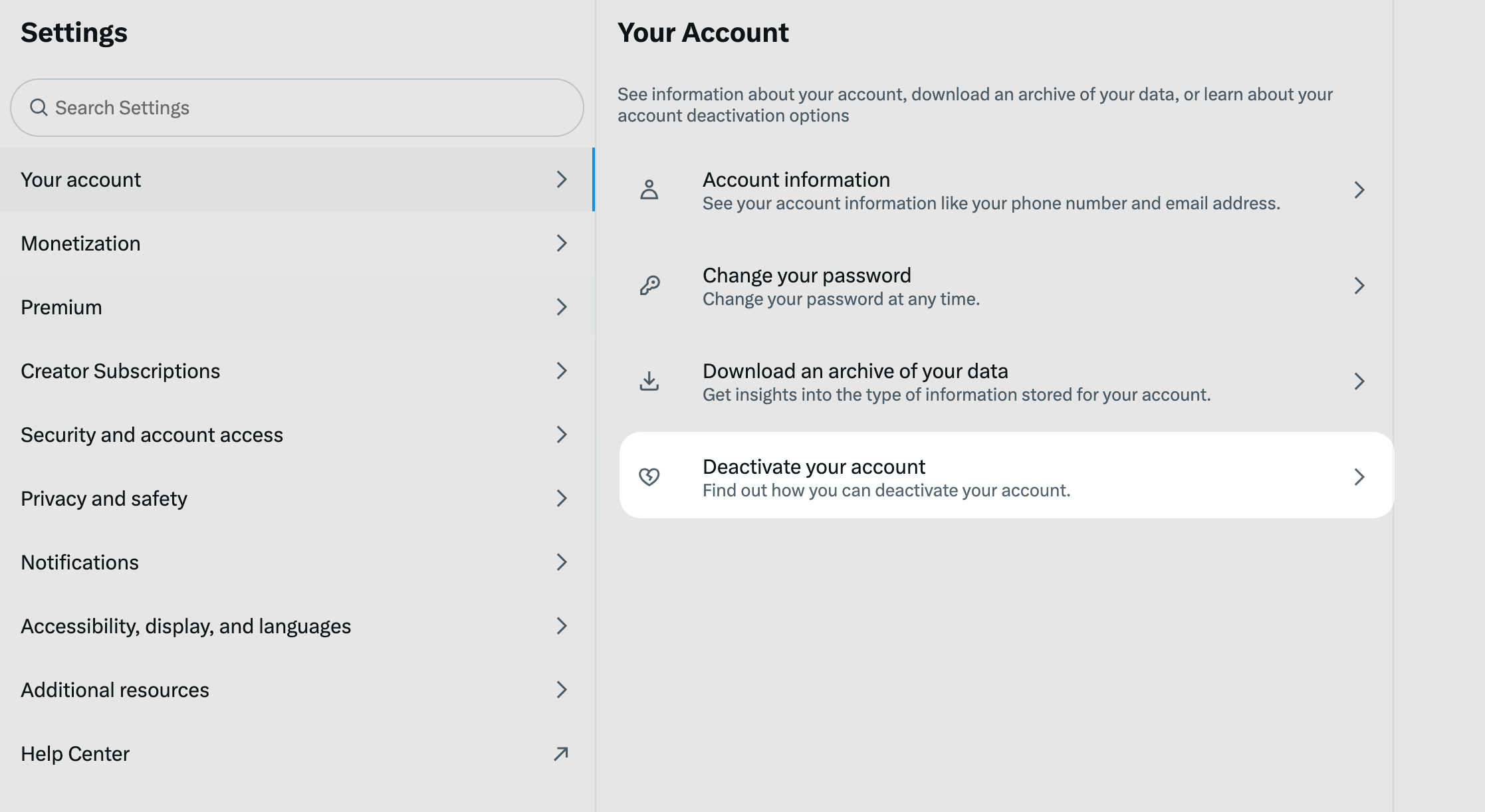
- Sign in to the X app or x.com.
- On mobile, tap your profile icon. On desktop, click More.
- Select Settings and privacy.
- Select Your account → Deactivate your account.
- Read the deactivation notice and select Deactivate.
- Enter your password, then confirm Yes, deactivate.
- Do not log in for 30 days.
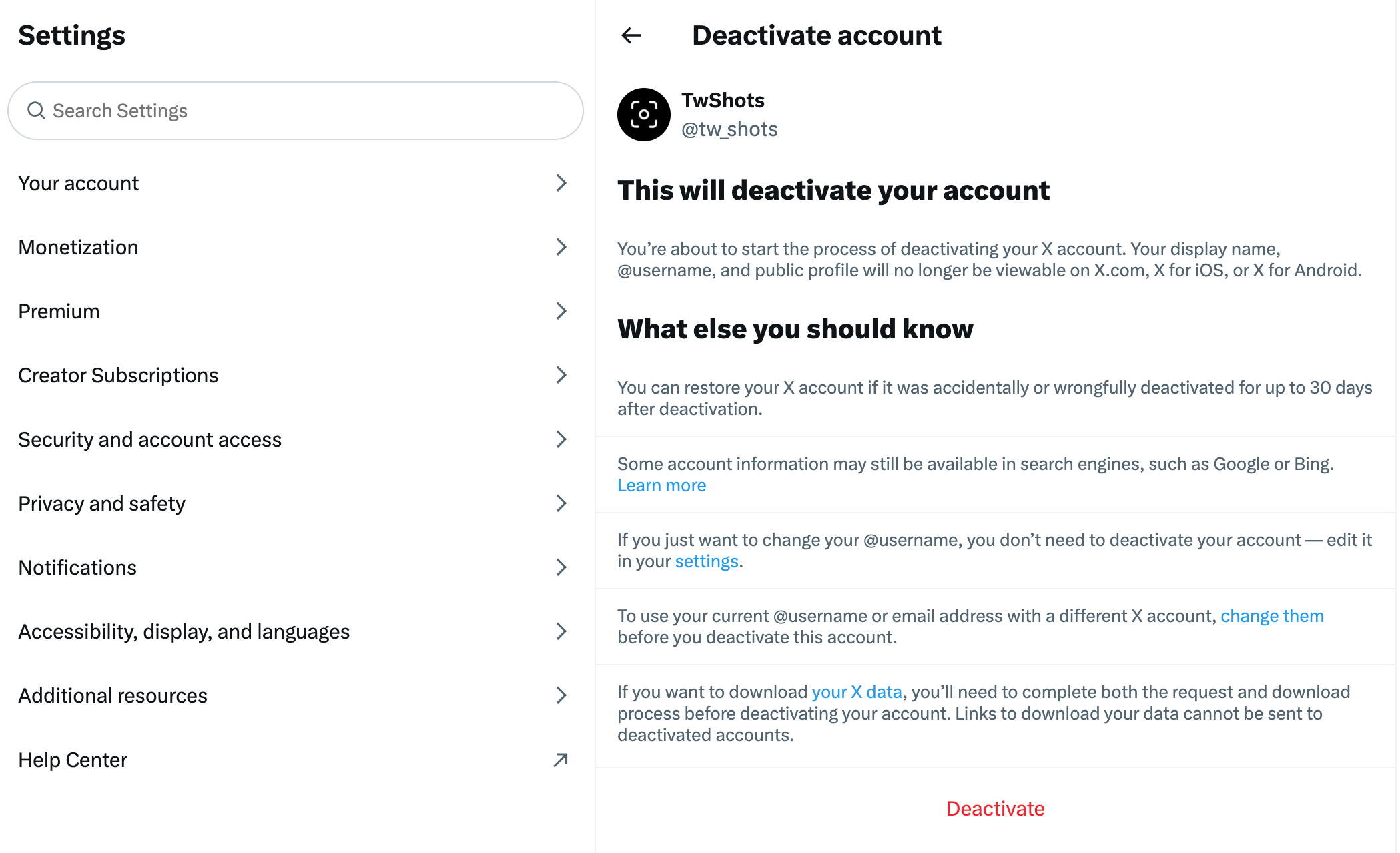
These steps follow the official X account deactivation guide.
What happens after you deactivate Twitter?
Your profile and username stop being visible on X after deactivation. The account is not deleted immediately: X keeps it recoverable for 30 days.
If you log in during that period, X reactivates the account and cancels deletion. If you leave it untouched for all 30 days, X permanently deletes it, and the username may become available to someone else.
Deleting the account does not guarantee that every trace disappears at once. Mentions of your username in other people's posts can remain, and Google or Bing may continue showing cached results that X does not control.
Can you recover a deleted Twitter account?
You can recover a deactivated account by logging in within 30 days and confirming reactivation. After more than 30 days, the previous account cannot be restored. You would need to create a new account.
If the account is locked or suspended, use the X account access form instead of the normal settings flow.
Frequently asked questions
Frequently asked questions
- Can I delete my Twitter account immediately?
- No. X requires you to deactivate the account first. The account is permanently deleted only after you leave it deactivated for 30 days without logging in.
- What happens if I log in during the 30-day period?
- Logging in within 30 days reactivates the account and cancels the deletion process. You must deactivate it again if you still want it deleted.
- Should I download my Twitter data before deleting my account?
- Yes, if you want to keep your posts, messages, media, or account history. Request your X archive before deactivating because you must be signed in to make the request.
- Does deleting Twitter remove old results from Google?
- Not necessarily. X does not control search-engine indexes, so cached profile pages or posts may remain visible until the search engine updates or removes them.
That is the complete process: deactivate, avoid signing in, and wait 30 days.
Create a Clean Twitter Screenshot
Before deleting your account—or whenever you want to preserve a public post—turn its URL into a polished, share-ready Twitter screenshot with TwitterShots.
- Paste any public Twitter or X post URL
- Export a clean, high-resolution image
- Choose light, dark, or gradient themes
- No design software required