How to Download a Twitter Video as MP4 (3 Steps)


To download a video from a supported public Twitter or X post as MP4, copy the post URL, paste it into TwitterShots Twitter MP4 Downloader, sign in if prompted, and open an available video quality. Then use the browser or video player download control to save the MP4 to your device.
- Required link: use the x.com or twitter.com URL of the public post that contains the video, not a profile, search, or shortened page URL.
- Three steps: copy the post link, paste it into TwitterShots, then open and save one of the MP4 results.
- Quality: 1080p or HD is available only when the source post provides it; the downloader does not upscale a lower-resolution upload.
- Devices: the workflow runs in a modern browser on iPhone, Android, Mac, Windows, and Linux without a browser extension.
- Limits: private, deleted, restricted, or unsupported posts cannot be retrieved, and sign-in or usage limits may apply.
What Is a Twitter MP4 Downloader?
A Twitter MP4 downloader retrieves downloadable MP4 video variants attached to a supported public X post. It does not turn a text-only post into a video, improve the original resolution, or unlock private media. TwitterShots shows only the video results it can retrieve for the supplied post, and availability can change when the post or account changes.
This distinction matters because two different tasks are often described as “Twitter to MP4”:
| Task | Correct tool | Output |
|---|---|---|
| Save a video already attached to a post | Twitter MP4 Downloader | A retrieved MP4 video variant |
| Turn a text or image post into a designed social video | Tweet to Video | A newly rendered video |
How to Download a Twitter Video as MP4
The normal workflow takes three steps. Use content you own or have permission to save.
Step 1: Copy the Link to the Video Post
Open the post that contains the video. Select the Share icon and choose Copy link to Post. X’s official sharing instructions confirm that this action copies the post URL to your clipboard.
A usable link normally contains both an account name and a numeric status ID:
https://x.com/username/status/1234567890
Links from both x.com and twitter.com are accepted. A profile URL, search results URL, Direct Message link, or link to a page that only embeds an external video is not the same as a public video post URL.
Step 2: Paste the Link into TwitterShots
Open TwitterShots Twitter MP4 Downloader, paste the post URL, and select Get MP4. Sign in if the page asks you to do so. TwitterShots validates the URL and looks for supported MP4 variants associated with the public post or a supported quoted post.
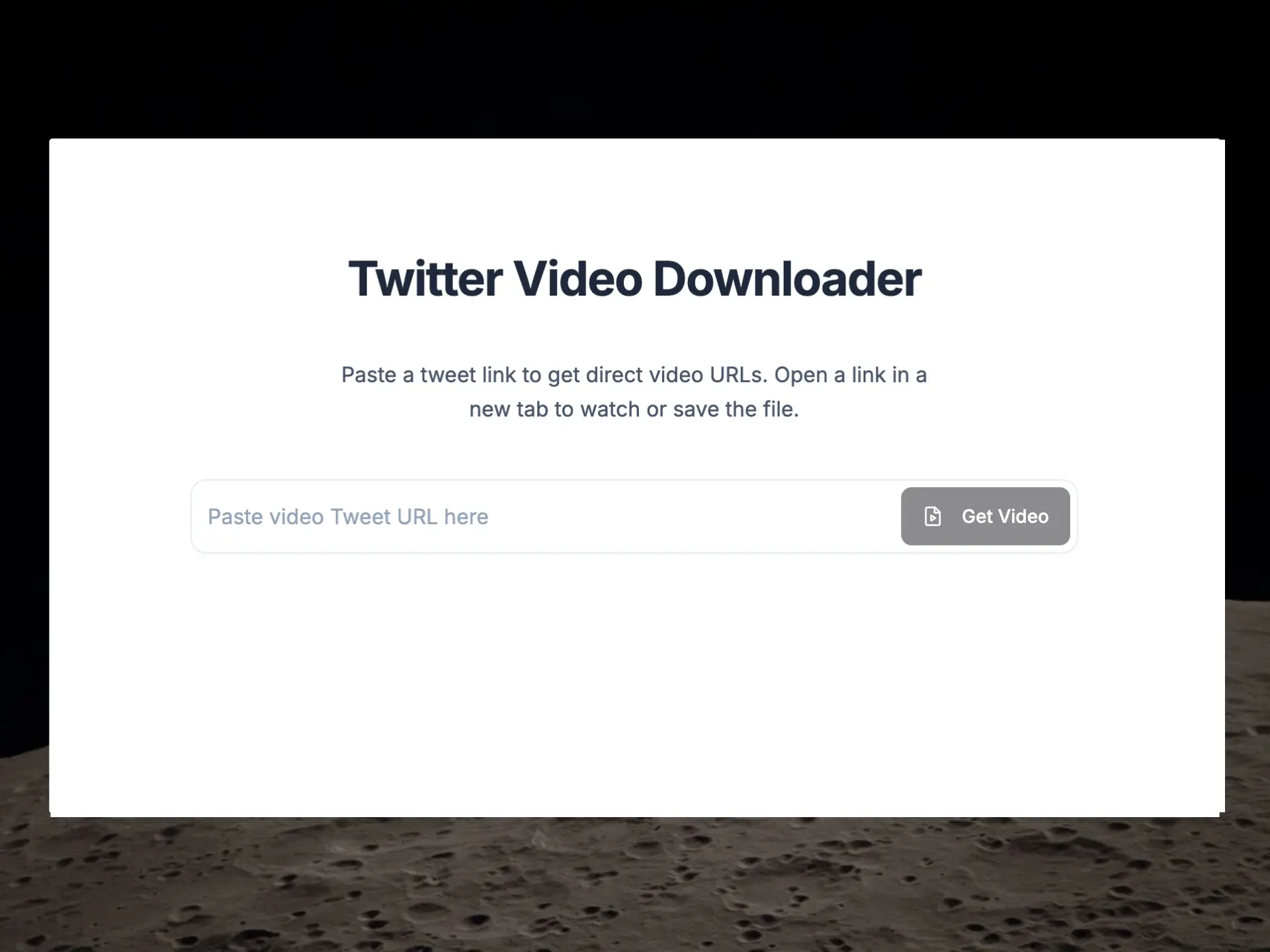
If the input is rejected, return to the original post and copy its link again. Manually copied URLs can be incomplete, and redirect or tracking links may not contain the status path the downloader needs.
Step 3: Choose an MP4 Quality and Save
When results are available, open the quality that fits your needs. The player opens in a new browser tab. Use its download control, the browser menu, or the device share menu to save the file. The exact label and save location vary by browser and operating system.
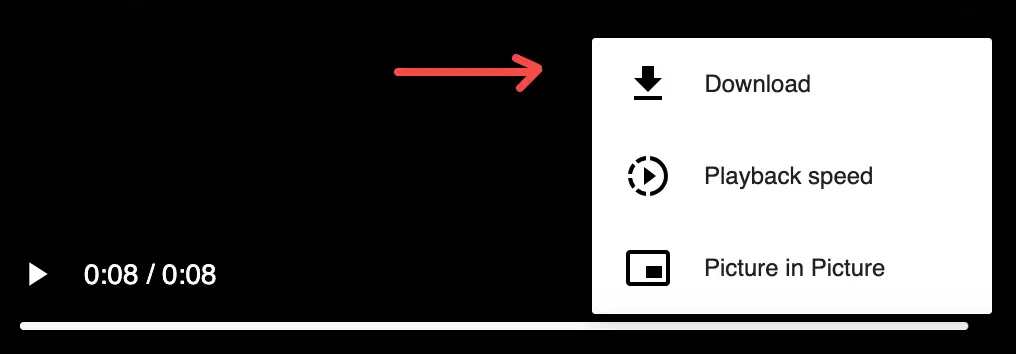
TwitterShots does not re-encode or add its own watermark to the retrieved source MP4. A logo, caption, or watermark already embedded in the original video remains part of the file.
How to Save the MP4 on Each Device
The retrieval step is the same across devices; only the final browser save action changes.
| Device | Recommended browser | Typical save action | Where to look afterward |
|---|---|---|---|
| iPhone or iPad | Safari | Open the MP4, then use the player or Share menu to save to Files or Photos when offered | Files → Downloads, or Photos |
| Android | Chrome or another current browser | Open the MP4 and select Download from the player or browser menu | Files → Downloads |
| Mac | Safari, Chrome, Firefox, or Edge | Open the MP4 and use the player download control or browser save command | Downloads folder |
| Windows or Linux | Chrome, Firefox, or Edge | Open the MP4 and select Download or Save video as | Downloads folder or chosen location |
Browser wording can change between versions. If the video opens instead of downloading immediately, that is usually a preview—not a failure. Look for a three-dot player menu, download icon, share action, or the browser’s save command.
Which MP4 Quality Should You Choose?
Choose the highest available quality when you plan to edit, crop, present, or watch the video on a large screen. Choose a smaller variant when download speed, mobile data, storage, or quick sharing matters more. “Best” means best for the task, not always the largest file.
| Quality shown | Useful for | Trade-off |
|---|---|---|
| 1080p | Editing, presentations, large displays | Largest file; appears only when available from the source |
| 720p | General viewing and social reuse | Good balance of detail and file size |
| 480p | Messaging and limited storage | Less detail, faster transfer |
| 360p or lower | Previews and slow connections | Smallest file, visibly softer image |
The resolution label describes the retrieved variant; it is not a promise that every post has that option. Account, plan, usage, source-media, and platform availability can affect which links are accessible.
X’s current Media Studio specifications accept MP4 and MOV uploads and recommend H.264 video with AAC audio for that product. Those upload specifications do not guarantee that every public post exposes the same downloadable resolution or codec combination.
Why a Twitter Video May Not Download
Use this diagnosis before retrying repeatedly:
| What you see | Likely reason | What to do |
|---|---|---|
| “Only X/Twitter links are supported” | The link is incomplete or is not a post URL | Copy the link again from the post’s Share menu |
| “No video found” | The post is text/photo-only, uses an unsupported embed, or the video is no longer available | Confirm that the original public post plays a native video |
| Sign-in screen | Video lookup requires an authenticated TwitterShots session | Sign in, then return to the same downloader URL |
| No 1080p or HD result | The source does not provide it, or that option is not available to the current account | Choose the highest accessible result; downloading cannot create missing detail |
| The MP4 opens but does not save | The browser is previewing the media | Use the player menu, share menu, or browser save command |
| A previously working post fails | The post was deleted, protected, restricted, or its media availability changed | Check the original post; the downloader cannot restore or bypass it |
For a broader download entry point and current service limitations, see Twitter Video Download. The table above covers the common URL, source, quality, sign-in, and browser-save cases for this workflow.
Does Downloading Change the Video?
TwitterShots retrieves MP4 results rather than rendering a new copy. It does not upscale the video, remove branding placed inside the original frames, translate audio, or convert a text-only post into MP4. This preserves the retrieved variant but also means the tool cannot repair low source quality.
If you need subtitles or translated audio, use the separate Twitter Video Translator. If you need a designed vertical or square video made from a post, use Tweet to Video.
Related Twitter Video Guides
- TwitterShots Twitter MP4 Downloader — paste a supported public post URL and retrieve available MP4 results.
- Download Twitter Videos in MP4 Quality — a concise three-step quality selection and download flow.
- Download Twitter Videos on iPhone and Android — mobile Safari and Chrome save steps and download locations.
- Twitter Video Download — broader download guide, limitations, and responsible-use information.
- SSSTwitter Video Downloader Guide — how the SSSTwitter workflow compares with TwitterShots.
- Top SSSTwitter Alternatives — existing downloader alternatives and selection criteria.
Frequently asked questions
- How do I download a Twitter video as an MP4?
- Copy the link to a supported public X or Twitter post, paste it into the TwitterShots Twitter MP4 downloader, sign in if prompted, select an available MP4 quality, and open the result. Then use the browser or video player download control to save the file.
- Can I download a Twitter video on iPhone or Android?
- Yes. The TwitterShots downloader works in modern mobile browsers. On iPhone, use Safari and save through the player or share menu. On Android, use Chrome or another browser and check the Downloads folder after saving.
- Can I choose 1080p or HD quality?
- Only when the source post provides that quality. TwitterShots lists the MP4 variants it can retrieve for the post; it does not create a higher-resolution version of a low-resolution upload. Account or usage limits may also affect available options.
- Does TwitterShots add a watermark to the MP4?
- No. TwitterShots opens the retrieved source MP4 variant and does not re-encode the file or add a TwitterShots logo. Any branding already present inside the original video remains part of that video.
- Why can’t I download a private or deleted Twitter video?
- TwitterShots does not bypass X access controls. Private, deleted, age-restricted, region-restricted, or otherwise unavailable posts may not be retrievable. The post must also contain supported video media rather than only text, photos, or an external link.
Download a Twitter Video as MP4
Paste a supported public X or Twitter post URL, open an available MP4 quality, and save it from your browser. Private, deleted, and restricted posts are not bypassed.
Open Twitter MP4 Downloader- Public Post URLs
- Available MP4 Qualities
- iPhone and Android
- No Added Watermark